Beginner / Canvas basics
Build a Memory Card Matching Game with HTML5 Canvas and JavaScript
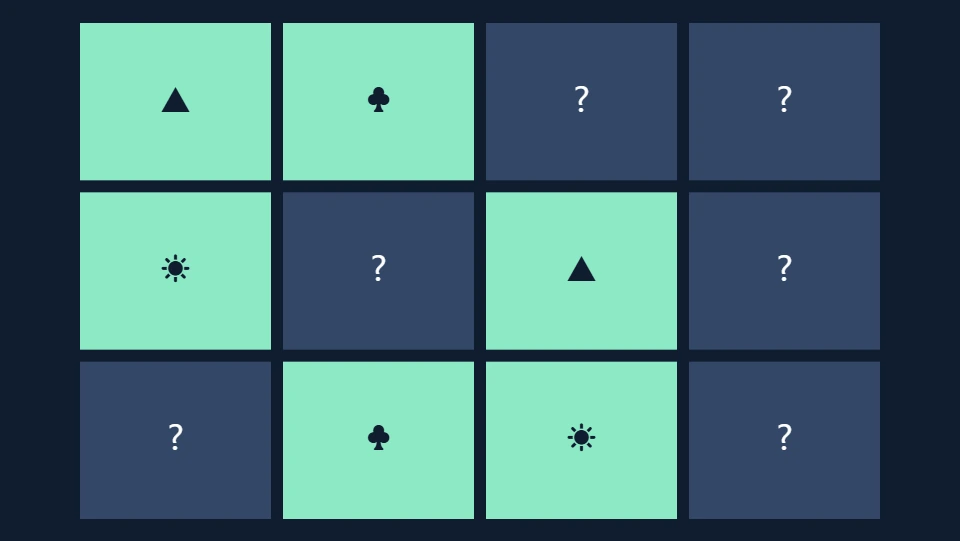
A memory game looks small until you describe exactly what happens between the first card flip and the next turn. Can a player click the same card twice? Can they open a third card while a mismatch is visible? What happens if they restart during that delay? These questions make this project useful for learning JavaScript state, not just for drawing a grid.
We will build the Memory Match demo that runs on this site. Its rules come from the original memory engine in this repository: reveal two cards, keep matching pairs face up, and briefly show a mismatch before hiding it. The implementation below moves the pictures onto Canvas and separates the rules from the browser controls. You can inspect every source file and run the complete project locally.
What you'll build
The finished board contains six, seven, or eight pairs. A move means choosing two different available cards. Matching a pair increases the pair counter; matching the final pair ends the round. There is no countdown, score penalty, account, or saved notebook. Difficulty changes the number of pairs, while the palette changes only the drawing color.
Start a round and deliberately choose two cards that differ. While they remain visible, try a third card. Nothing should change until the delay ends. This small experiment reveals the most important constraint in the implementation: the game must reject input that would create an impossible board state. Keep that behavior in mind while reading the code.
Prerequisites
You should recognize JavaScript arrays, objects, functions, and basic event listeners. Familiarity with destructuring helps, but you do not need a framework or a game library. The download includes a browser bundle so you can open its index.html directly. Use HTTP when working with the original JavaScript modules, which have loading restrictions when opened directly from disk. The README in the archive also includes a local server command.
The relevant files are engines/memory.js for the rules and drawing, engines/core.js for shared coordinates and the animation loop, and demo.js for controls. Read these in that order. The source download contains their dependencies and a runnable page, so the excerpts in this article do not need to serve as a second, incomplete distribution of the game.
1. Give the board a stable coordinate system
Our logical canvas measures 960 by 540 units. The page scales its displayed width to fit the available space. This keeps the layout equations independent of the phone or laptop that displays the game. Setting only the CSS width would not change the underlying drawing coordinate system, which is why the canvas also declares explicit width and height attributes.
The cardRect function returns the rectangle for a card index. Four columns stay fixed; the row count is the deck length divided by four, rounded upward. A twelve-card board needs three rows, while fourteen and sixteen cards need four. Empty positions on the final row are acceptable: they are not invisible cards and cannot receive input. The dimensions leave a margin around the board and a gap between cards.
These rectangles serve two consumers. Canvas uses them for the visible cards, and the browser control layer uses the same values to position transparent buttons. Sharing that geometry prevents the clickable area from drifting away from the picture after a responsive resize. Inspect cardRect in the source before changing column count or margins; the drawing and controls must continue to agree.
2. Create two distinct cards for every symbol
Each card needs its own object, even when two cards share a symbol. If you put the same object into the array twice, changing one card's matched property would also change the other reference. That can make a broken implementation appear to find pairs without actually checking both positions. Our deck builder creates two separate objects per symbol.
export function makeDeck(pairCount, random = Math.random) {
  const symbols = ['★', '◆', '●', '▲', '☀', '♣', '☂', '♥'];
  const deck = symbols.slice(0, pairCount).flatMap(symbol => [
    { symbol, matched: false }, { symbol, matched: false }
  ]);
  // Fisher–Yates: each remaining position has the same chance of being picked.
  for (let i = deck.length - 1; i > 0; i--) {
    const j = Math.floor(random() * (i + 1));
    [deck[i], deck[j]] = [deck[j], deck[i]];
  }
  return deck;
}
The shuffle is Fisher–Yates. Starting at the final position, choose an index from zero through the current position, swap the two cards, then shrink the remaining range. This is preferable to sorting with a random comparator because a comparator is supposed to express consistent ordering. Random comparisons do not provide that contract or a straightforward uniform shuffle.
The optional random argument is useful when testing. Production uses Math.random, while a test can inject a repeatable generator or a fixed value. You are not promising cryptographic randomness here; you are making a casual board difficult to predict. Confirm the deck length and count each symbol after shuffling. Every supported setting should still contain exactly two copies of each selected symbol.
3. Represent a turn with explicit state
The engine stores the deck, an array of selected indexes, the move count, matched-pair count, and a mismatch delay named hideIn. It also records whether the game has finished and whether that finish is a win. These fields are the source of truth. Text on the page and pixels on the canvas are outputs derived from that state.
Think of selected as a tiny state machine. An empty array means the player can choose a first card. One index means the player can choose a different second card. A mismatching second choice leaves two indexes visible while hideIn is positive. A matching choice marks both cards and immediately clears the selection. There is no valid path that leaves three selected indexes.
This model also clarifies scoring. Incrementing moves on the first flip would count half a turn; incrementing on every click would count rejected input. We increment only after accepting a second card. The pair counter increases only when the symbols agree. The winning condition compares that counter to the configured number of pairs, so increasing the board size requires no separate victory rule.
4. Accept only legal choices
The choose function is the public input boundary. Callers send an index, and the engine decides whether that index can affect the state. It rejects missing cards, completed games, mismatches that are still being displayed, already matched cards, and a repeated click on the currently selected card. Keeping those checks together makes both mouse and keyboard input follow the same rules.
function choose(index) {
    const card = state.deck[index];
    if (!card || state.finished || state.hideIn > 0 || card.matched ||
        state.selected.includes(index)) return;
    state.selected.push(index);
    if (state.selected.length !== 2) return;
    state.moves++;
    const [a, b] = state.selected;
    if (state.deck[a].symbol === state.deck[b].symbol) {
      state.deck[a].matched = state.deck[b].matched = true;
      state.selected = [];
      state.pairs++;
      state.finished = state.won = state.pairs === pairCount;
    } else {
      state.hideIn = 0.85;
    }
  }
After two legal selections, compare symbols rather than indexes. Indexes identify positions; symbols identify pairs. A match sets two matched flags, clears the temporary selection, and increments pairs. A mismatch sets the delay without hiding either card immediately. This lets the player actually see and remember the second card before the next turn begins.
Try removing the duplicate-selection guard in a private experiment. Selecting the same position twice would compare a symbol with itself and manufacture a pair. Restore the guard afterward. This is a useful example of why interaction tests should include invalid actions, rather than only the happy path where the player chooses every correct pair in order.
5. Measure the mismatch delay inside the update step
The earlier engine used a timeout and a run identifier to prevent an old callback from changing a restarted board. In this version, the delay lives in the game state and advances through update(dt). Restarting creates a new engine object, so there is no pending timeout from the previous round waiting to mutate the replacement deck.
function update(dt) {
    if (state.hideIn <= 0) return;
    state.hideIn = Math.max(0, state.hideIn - dt);
    if (state.hideIn === 0) state.selected = [];
  }
Here dt means simulated seconds since the previous frame. The shared loop limits a single step to 0.05 seconds. A mismatch therefore remains visible for roughly 0.85 seconds of active simulation. Pausing also pauses that delay. This is an intentional behavior: a learner can pause while inspecting the board, then resume without losing the current reveal.
The subtraction is clamped at zero so the selection clears on the update that reaches the boundary. Without the clamp, a check for exact zero could fail after the counter becomes negative. This example illustrates a general rule for countdown state: define what happens when the boundary is crossed, instead of relying on floating-point subtraction to land on a particular value.
6. Draw from state without changing the rules
The renderer paints the background, then visits every card. A card is visible if it has been matched or its index is in the temporary selection. Visible cards use the selected palette and display their symbol; other cards display a question mark. Drawing never increments moves, chooses cards, shuffles, or resolves a mismatch.
function draw(ctx, color) {
    background(ctx);
    state.deck.forEach((card, index) => {
      const r = cardRect(index, state.deck.length);
      const visible = card.matched || state.selected.includes(index);
      ctx.fillStyle = visible ? color : '#334766';
      ctx.fillRect(r.x, r.y, r.width, r.height);
      ctx.fillStyle = visible ? '#101d30' : '#ffffff';
      ctx.font = '36px system-ui';
      ctx.textAlign = 'center';
      ctx.textBaseline = 'middle';
      ctx.fillText(visible ? card.symbol : '?', r.x + r.width / 2,
        r.y + r.height / 2);
    });
  }
That separation makes repainting safe. A palette change can redraw immediately without advancing the game. A test can examine state without creating a real canvas. Later you could replace rectangles with images while preserving the same rules. Set the font and alignment explicitly because a Canvas context retains drawing properties between calls; relying on a previous renderer's settings makes modules unexpectedly dependent on each other.
At this stage, inspect the board at a narrow browser width. Symbols should remain centered, the page should not scroll sideways, and the board should preserve its aspect ratio. Logical coordinates simplify these checks but do not automatically provide high-density display sharpness. A future rendering exercise can introduce a device-pixel-ratio backing buffer while keeping the logical board unchanged.
7. Add controls that remain usable without a pointer
Canvas pixels do not expose individual card buttons to the accessibility tree. The demo therefore positions real HTML buttons over the card rectangles. They have no visual fill, but their focus outline remains visible. Each accessible label includes the position and, when revealed, the symbol. Matched buttons become disabled, and the status text reports pairs and moves.
Use Tab to reach a card and Enter or Space to activate it. The same choose(index) function handles the result. The wrapper pauses when focus leaves the game, so returning may require Resume. It also pauses when the tab becomes hidden. These choices make the example easier to inspect and avoid invisible game updates while you are reading another section of the page.
This does not make every Canvas interaction automatically accessible. Test announcements and focus behavior with the assistive technologies your audience uses. In particular, avoid rebuilding the entire button layer every frame: replacing focused elements would make keyboard play frustrating. Our wrapper builds buttons on reset and updates their labels during rendering, leaving the controls in place while a round runs.
8. Check the invariants before adding features
Test a complete board, a mismatch, a duplicate click, an attempted third selection, and a restart during a mismatch. A complete six-pair board should report six pairs. A duplicate click should leave the move count unchanged. A mismatch should eventually hide both selections, and restarting should immediately restore a fresh, unselected board with zero moves.
Also test all supported pair counts. Randomness can hide mistakes, so use the injectable generator when writing repeatable checks. You can find each symbol's two positions from the state, choose those positions, and verify that completion happens only after the last pair. These tests measure rule behavior rather than comparing a screenshot of a particular shuffled layout.
Next steps
Read Writing a Simple Game Loop with requestAnimationFrame to understand the scheduler that drives the mismatch countdown. Then inspect Memory Match on its dedicated page, where you can switch settings and download the runnable source. Try adding a best-move display only after deciding how resets and difficulty changes should affect it.
For browser API details, consult MDN's Canvas basic usage guide. The project-specific decisions in this walkthrough come from the linked source files. Keeping rules, drawing, and input separate gives you a concrete place to make each change, and a small set of invariants to check when you do.