Intermediate / Input & touch
Add Keyboard Controls to a Canvas Memory Board
Drawing a button-shaped rectangle on Canvas does not create a keyboard-accessible button. Pixels do not supply a focus target, an accessible name, or activation behavior. Memory Match solves that specific problem by sharing its drawing geometry with a layer of real HTML buttons.
What you'll build
We will examine the demo's existing keyboard layer: one button per card, labels derived from state, and focus handling when a matched button becomes disabled. This is a practical implementation discussion, not a claim that every Canvas game becomes accessible through the same overlay.
Prerequisites
Know HTML buttons and the difference between visual appearance and document semantics. Read cardRect in memory.js and render in demo.js. The source keeps game rules independent of the button implementation.
Use one geometry calculation
The renderer uses cardRect to draw every card. The wrapper converts that same rectangle to percentages for the button overlay. A resize scales the canvas and overlay together, keeping the focusable target aligned with its visible card.
Duplicating the layout equations in CSS would create two sources of truth. A later change to gaps or row count could move the image without moving its button. Shared geometry makes that kind of mismatch easier to avoid and test.
The overlay buttons have transparent backgrounds, but their focus outlines remain visible. Hiding the entire button with display: none would also remove its normal focus behavior. Transparency is used for appearance; the element still supplies semantics and activation.
Give each state a meaningful label
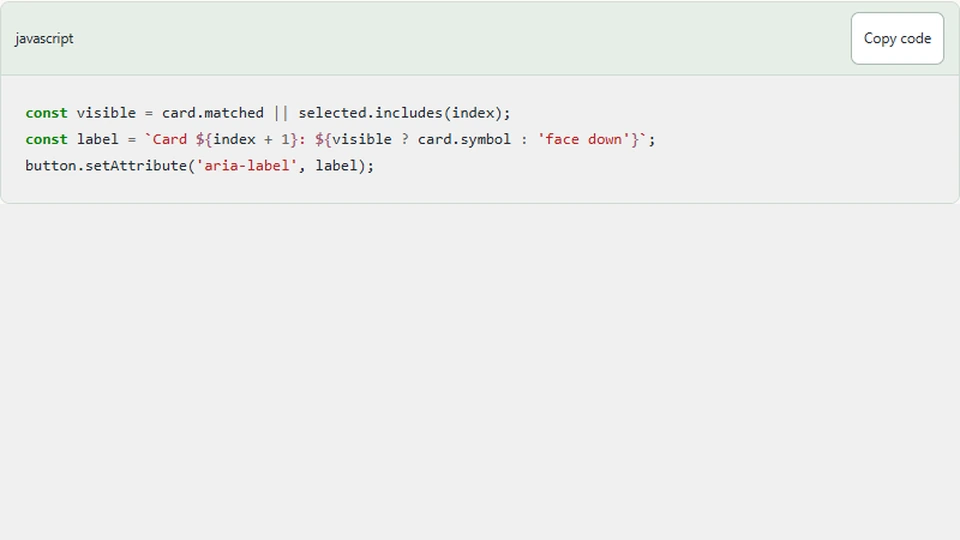
A face-down card is labeled by position. A revealed card includes its symbol, and a matched card is identified as matched. The label must follow what the player is allowed to know; exposing every hidden symbol in accessible names would turn keyboard or screen-reader use into a different game.
const visible = card.matched || selected.includes(index);
const label = `Card ${index + 1}: ${visible ? card.symbol : 'face down'}`;
button.setAttribute('aria-label', label);
This is the labeling idea in isolation. The actual wrapper also includes matched status and enables or disables controls according to the running round. Enter and Space activate the real button, which calls the same engine choose method as a pointer click.
Keep focus when a match disables a button
After a match, both solved card buttons become disabled. If one currently holds focus, disabling it can move focus outside the arena. The wrapper's focus-leave handler would then interpret that as the player leaving and pause the game.
The current renderer moves focus to another unmatched card before disabling the matched one. If no unmatched card remains, it focuses Start / Restart. This preserves an understandable location inside the game and avoids an unintended pause after every successful pair.
That behavior was important enough to exercise through real controls when capturing gameplay thumbnails. A model-only test cannot detect every focus effect caused by a browser disabling a button.
Avoid rebuilding controls every frame
The wrapper creates the overlay on reset and updates labels during rendering. Replacing all buttons on every animation frame would destroy focused elements repeatedly, even though the board had not changed. It would also create unnecessary DOM work for a game whose visual state is mostly stable.
Keep persistent controls stable while updating their properties. Rebuild when the deck itself changes, such as after choosing a different difficulty. A new round is a reasonable boundary for creating a different set of card controls.
Announce useful changes
The status region reports pairs and moves rather than every animation frame. It can communicate the result of a comparison without trying to narrate the entire picture. Labels and status serve different roles: labels describe available controls, while status summarizes progress.
Test how often announcements occur with an actual screen reader. A technically valid live region can still be exhausting if its text changes too frequently. Also inspect focus order and contrast at narrow widths; an accessible name alone does not make a tiny or invisible focus target usable.
Next steps
Play Memory Match using only Tab, Enter, and Space. Complete a pair and confirm focus stays inside the game. Then leave the arena and verify its documented pause behavior. For a different engine, begin by identifying meaningful actions rather than assuming a grid of invisible buttons can describe continuous motion.