Beginner / Game loop
Writing a Simple Game Loop with requestAnimationFrame
A falling gem should not move twice as fast merely because a player opens your game on a screen that refreshes twice as often. It should also avoid teleporting across the arena when the player returns from another tab. Both problems lead to the same design question: how does a game measure the passage of time?
This tutorial builds the loop used by Gem Collector, one of the four local engines in this repository. We will examine the real scheduler, follow time into the collector's movement and collision rules, and decide what pause and restart mean. The result is deliberately small enough to read without a framework, yet complete enough to expose the problems a timer-only example tends to hide.
What you'll build
You will connect an update function and a drawing function to a single animation scheduler. The game moves a collector horizontally, spawns gems and hazards, and ends after reaching a gem target, losing three lives, or using 75 seconds of active simulation time. Difficulty changes the spawn interval, falling speed, hazard probability, and required gem count.
Start the embedded example, hold an arrow key while the game has focus, and then pause. Resume after a few seconds. Objects should continue from their existing positions rather than advancing through the entire pause at once. Changing difficulty resets the round instead of modifying a partially completed target. The palette can change without resetting the model because it affects only rendering.
Prerequisites
You should be comfortable passing functions as arguments and reading a JavaScript object. The example uses browser modules, Canvas, and event listeners, but no package manager is required to run the downloaded demo. Serve the extracted directory with a local HTTP server, open its index page, and use browser developer tools to inspect engines/core.js and engines/collector.js.
It helps to know that the browser coordinates JavaScript work with rendering. According to the requestAnimationFrame reference on MDN, this API requests a callback before a repaint. It is a one-shot request, so your callback must request another frame to continue. The timestamp argument is the time input our loop uses; it is not a promise of a fixed frame interval.
1. Separate simulation from rendering
An update function changes the world. It moves the collector, advances falling objects, resolves collisions, and decides whether the round has ended. A rendering function reads that world and paints it. Splitting these responsibilities means a redraw can happen without changing a score, and a rule test can run without opening a browser window.
In the collector module, createCollector constructs a state object and returns methods that operate on it. The wrapper creates one instance for the current round. The shared loop knows nothing about gems, lanes, cards, or rings; it only calls the functions it receives. This boundary lets the same scheduler serve all four demos without turning their rules into a large collection of mode checks.
The state starts with a collector in the middle, no falling objects, zero score, three lives, and zero elapsed time. A restart creates another state object. Rendering that initial state shows a ready board, but does not begin simulation. The Start button explicitly begins scheduling, which keeps page loading and playing as separate actions.
2. Maintain exactly one scheduled chain
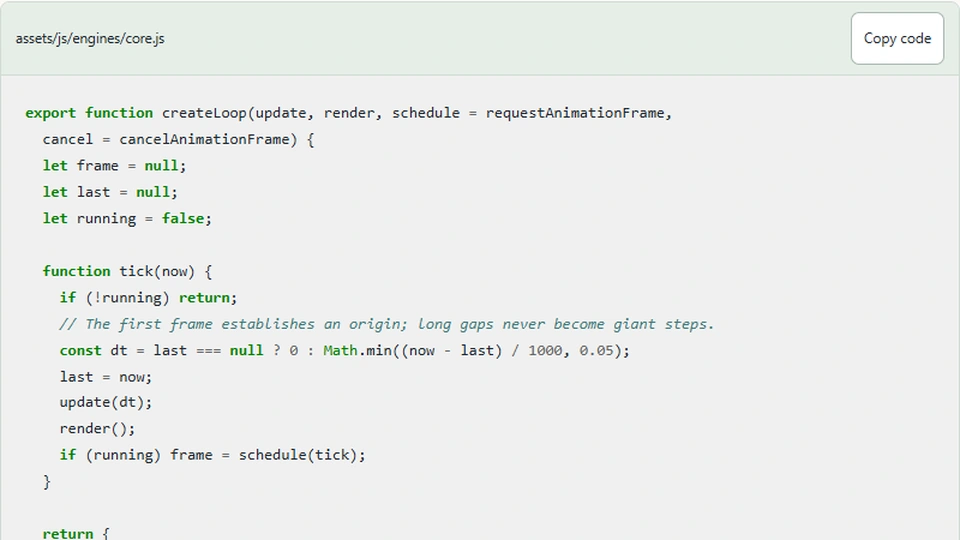
Here is the complete shared scheduler. Read the start and stop methods before focusing on the time calculation. Starting twice should not create two independent chains of callbacks. Stopping should cancel the scheduled callback and also tell a callback already executing that it must not request a successor.
export function createLoop(update, render, schedule = requestAnimationFrame,
  cancel = cancelAnimationFrame) {
  let frame = null;
  let last = null;
  let running = false;

  function tick(now) {
    if (!running) return;
    // The first frame establishes an origin; long gaps never become giant steps.
    const dt = last === null ? 0 : Math.min((now - last) / 1000, 0.05);
    last = now;
    update(dt);
    render();
    if (running) frame = schedule(tick);
  }

  return {
    start() {
      if (running) return;
      running = true;
      last = null;
      frame = schedule(tick);
    },
    stop() {
      running = false;
      if (frame !== null) cancel(frame);
      frame = null;
      last = null;
    },
    get running() { return running; }
  };
}
The running flag handles that second case. The update callback may discover that the round has ended and call stop. After update and render return, tick checks running again before requesting another frame. Without that check, a finished game could silently schedule an extra chain even though the interface already says the round is over.
The frame identifier starts as null, rather than relying on zero as a special value. It exists only so cancelAnimationFrame can cancel an outstanding request. The identifier is not the elapsed time and should never be used to calculate movement. We also inject the scheduling functions as optional arguments, which lets tests manually deliver timestamps and inspect how many callbacks remain queued.
3. Convert the timestamp difference into seconds
The browser supplies timestamps in milliseconds. Subtracting the previous timestamp gives the interval between callbacks; dividing by 1,000 expresses it in seconds. The collector's horizontal speed is 500 logical units per second. At a normal interval of roughly 0.0167 seconds, moving right adds about 8.35 units, rather than adding 500 on every frame.
The first callback has no previous timestamp, so the loop uses a zero-duration update and records its origin. This avoids treating all time since browser startup as the first game step. On later frames, the same equation handles small timing variations. A faster refresh rate creates more updates with smaller deltas, keeping the overall motion approximately consistent.
Do not assume that the callback always arrives at 60 Hz. The actual schedule depends on the display, browser, available resources, and page visibility. A variable-delta loop handles these normal differences well for this simple project. It does not guarantee identical outcomes across devices because random spawning, input timing, and numerical integration still influence the simulation.
4. Put a limit on unusually large steps
Our loop caps one update at 0.05 seconds. If a callback arrives 800 milliseconds after the previous one, the simulation advances by 50 milliseconds rather than jumping through the full delay. This is a deliberate time policy. We discard excess wall-clock time instead of trying to catch up immediately, which keeps this teaching demo responsive after a stall.
That choice means the displayed 75-second round measures accumulated simulation time. Under sustained rendering delays, it may take longer than 75 seconds on a real clock to finish. If you need a strict real-time deadline, track a separate wall-clock deadline and describe how pausing affects it. Do not silently use one clock for movement and another for a timer that appears to measure the same thing.
The clamp also reduces collision tunneling: an object is less likely to cross the entire collision band between updates. It does not eliminate the problem for arbitrary speeds. A production physics system might use fixed simulation steps, a bounded accumulator, or swept collision tests. Those are useful extensions once you can explain the tradeoff this small loop currently makes.
5. Follow delta time into the collector rules
The collector update advances the active timer, accumulates spawn time, applies horizontal movement, and then visits the falling objects. All movement multiplies a speed by dt. The logical playfield remains 960 units wide even when CSS displays it at a much smaller width, so game speed does not depend on the number of physical pixels across the phone.
function update(dt, direction = 0) {
    if (state.finished) return;
    state.time += dt;
    state.spawn += dt;
    state.x = clamp(state.x + direction * 500 * dt, 45, WIDTH - 45);
    if (state.spawn >= 0.52 - difficulty * 0.035) {
      state.spawn = 0;
      state.objects.push({ x: 40 + random() * (WIDTH - 80), y: -25,
        bad: random() < 0.23 + difficulty * 0.015 });
    }
    for (const object of state.objects) {
      object.y += (150 + difficulty * 25 + state.time * 1.2) * dt;
      if (object.y > HEIGHT - 78 && object.y < HEIGHT - 25 &&
          Math.abs(object.x - state.x) < 52) {
        object.y = HEIGHT + 60; // Consume once, then remove below.
        if (object.bad) state.lives--;
        else state.score++;
      }
    }
    state.objects = state.objects.filter(object => object.y < HEIGHT + 30);
    state.won = state.score >= goal;
    state.finished = state.won || state.lives <= 0 || state.time >= 75;
  }
Look closely at the horizontal clamp. The collector center stays between 45 and WIDTH - 45, matching its half-width. Clamping the center at zero would allow half the paddle to disappear beyond the left edge. Pointer movement uses the same bounds after converting the displayed pointer position into logical coordinates, so keyboard and touch controls agree about the reachable region.
The spawn accumulator resets when it reaches the configured interval. This version creates at most one object in an update and discards the small remainder. That matches the simple cadence of the original engine, but it is not mathematically exact interval scheduling. If you need more precise rates, subtract the interval and consider a bounded loop, taking care not to create a huge backlog after a stall.
6. Resolve collisions once and remove consumed objects
Objects fall at a base speed that grows with difficulty and active time. A collision requires the object to enter the collector's vertical band and lie within 52 logical units horizontally. This is a compact arcade approximation rather than a general circle-and-rectangle intersection test. Its benefit here is that you can read the complete rule beside the movement code.
When the collector catches an object, we move it below the playfield. A gem adds one point; a hazard removes one life. The filter at the end removes both consumed and missed objects. Marking a consumed object before the next frame prevents it from being counted repeatedly while it remains near the paddle. Otherwise one gem could award several points simply because it overlaps for multiple updates.
The win check runs after collision processing. Reaching the target wins; otherwise losing all lives or reaching the active time limit ends the round. Because several objects can overlap in one update, this ordering defines the result if a target gem and a hazard arrive together. If you want a different priority, change that rule explicitly and add a test for the simultaneous event.
7. Keep held input separate from frame scheduling
The interface stores left and right as held directions. Each update converts that set into minus one, zero, or plus one. Pressing both directions produces zero. A key repeat does not create another scheduler and does not directly move the paddle by a fixed distance; movement happens when the update consumes the current direction and elapsed time.
On touch screens, dragging converts the pointer position to logical coordinates through canvasPoint. The visible buttons support sustained pointer presses, while keyboard activation moves the collector in discrete increments. Pointer capture helps receive the release event even if a finger leaves the button. Cancellation and lost-capture handlers clear the held direction so an interrupted gesture cannot keep the collector moving forever.
The game accepts movement keys only while focus is inside its controls. This matters in an article with an embedded demo: arrow keys should scroll the document when the reader is elsewhere. When the game loses focus, the wrapper clears held input and pauses. It also pauses when the browser tab is hidden, which avoids surprising movement after the reader returns.
8. Define pause, resume, and restart precisely
Pause preserves the model and stops the scheduler. Resume preserves the model but clears the previous timestamp, so its first update has zero elapsed time. Restart stops the old chain, clears held input, constructs a fresh engine, renders it, and starts a new chain. These are three distinct operations even if the interface uses only two buttons.
Try this debugging sequence: start, move, pause, wait, resume, then restart twice quickly. After resuming there should be no large jump. After restarting there should be one active frame chain, zero points, three lives, and no old objects. Changing difficulty should return to the ready state and require another Start. This makes a settings change predictable and prevents an old target from leaking into a new round.
Our scheduler's tests drive it with synthetic timestamps rather than sleeping in real time. They check the initial zero delta, a normal interval, the cap after a long gap, a second Start call, cancellation, and a fresh origin after Resume. Engine tests separately place gems and hazards in the collision band. Keeping those tests separate makes a failure easier to diagnose.
Next steps
Open Gem Collector to inspect or download the runnable project, then compare its update method with Lane Racer. Racing uses discrete lane changes but still multiplies falling speed and progress by elapsed time. The scheduler does not change merely because the input model changes.
If you prefer a game with less continuous movement, read Build a Memory Card Matching Game with HTML5 Canvas and JavaScript. Its mismatch countdown uses the same dt interface. As an exercise, add a visible pause explanation or experiment with a fixed-step accumulator in a separate branch. Preserve the single-chain invariant and document whether each timer measures active simulation time or elapsed real time.