Focus and Pause in HoloViral Original Arcade Games
Distinguish page focus, in-game pause, resume, and restart when keyboard controls or movement appear to stop.
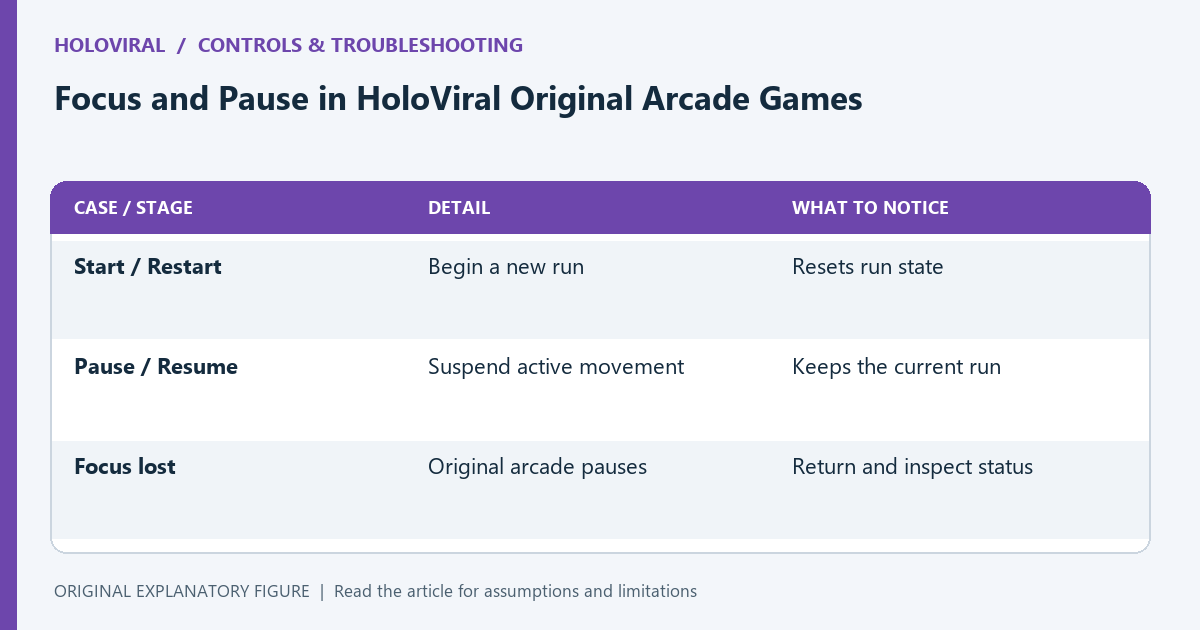
A stopped arcade game is not always a loading problem. Focus can move away from the player, a pause can be active, or a completed run can require restart. This guide describes HoloViral’s bundled original arcade engine. Provider-hosted games may behave differently, so use their displayed controls rather than assuming the same focus and pause rules apply everywhere.
Check whether the run is active
The original moving games begin when you press Start. After a run ends, the control becomes Restart. A completed run cannot be resumed as if it were an ordinary pause. Read the status line and the button label before repeatedly pressing movement keys.
For a first check, open Orbit Collector and begin one run. Confirm that objects move and the score display changes. If the arena never becomes ready, use the loading checklist instead of treating it as a pause-state issue.
Return focus to the player
Keyboard input belongs to the focused context. If you click the page search box or another interface element, your keys may go there instead of to the game. Click inside the player and read the current status.
The original engine clears held-key state when its window loses focus and pauses a running non-memory game. That behavior prevents a movement key from remaining logically held after you leave the player. Returning focus may therefore also require an explicit Resume.
Use pause deliberately
During a moving run, Pause stops the engine’s animation loop. The button becomes Resume. Resume restarts the loop with a fresh timing reference so the paused interval is not treated as continuous active play.
Use the control before adjusting your grip or reading a long note. Do not assume changing tabs is an equivalent pause mechanism for every provider game. This guide’s behavior comes from the local original engine, not from a universal browser guarantee.
Know the memory-game exception
The original memory mode has no countdown and hides the pause button. You can think between reveals without using the arcade pause control. A brief mismatch display still runs as part of the card interaction.
If you are playing Neon Pairs, focus questions concern clicking or tapping the correct card rather than resuming continuous movement. Check the mode’s instructions. A pause workflow appropriate for a lane racer is unnecessary for a board with no time limit.
Report the state precisely
If controls still seem wrong, record the game title, device, browser, status text, and whether the button says Start, Pause, Resume, or Restart. Note where you clicked before the issue appeared. Those details make a reproduction more useful than “the game froze.”
Try one controlled sequence: start, move, pause, resume, then restart after the run ends. Avoid changing browser, device, and game simultaneously. The aim is to identify the state transition that failed rather than repeatedly reloading a working game.
| Case or stage | Detail | What to notice |
|---|---|---|
| Start / Restart | Begin a new run | Resets run state |
| Pause / Resume | Suspend active movement | Keeps the current run |
| Focus lost | Original arcade pauses | Return and inspect status |